
Zaproś wsparcie Social WiFi
Aby umożliwić Social WiFi zdalną konfigurację integracji, zaproś zespół wsparcia do swojego kontrolera UniFi, tworząc konto administratora zgodnie z poniższymi krokami.
Wymagania wstępne
- dostęp do kontrolera, na przykład przez https://unifi.ui.com
- rola Właściciel (Owner) w kontrolerze
Zaproś Social WiFi do swojego kontrolera UniFi
- Otwórz swój kontroler UniFi w przeglądarce internetowej.
- Przejdź do zakładki Ludzie (People) w menu nawigacyjnym po lewej stronie.
- Kliknij Utwórz nowy (Create New), aby otworzyć formularz nowego użytkownika.
- Wypełnij pola, używając wartości z poniższej tabeli.
| First Name | Social WiFi |
|---|---|
| Last Name | pozostaw puste |
| support@socialwifi.com | |
| Admin | Zaznaczone |
| Restrict to Local Access Only | Odznaczone |
| Use a Predefined Role | Zaznaczone |
| Role | Super Admin |
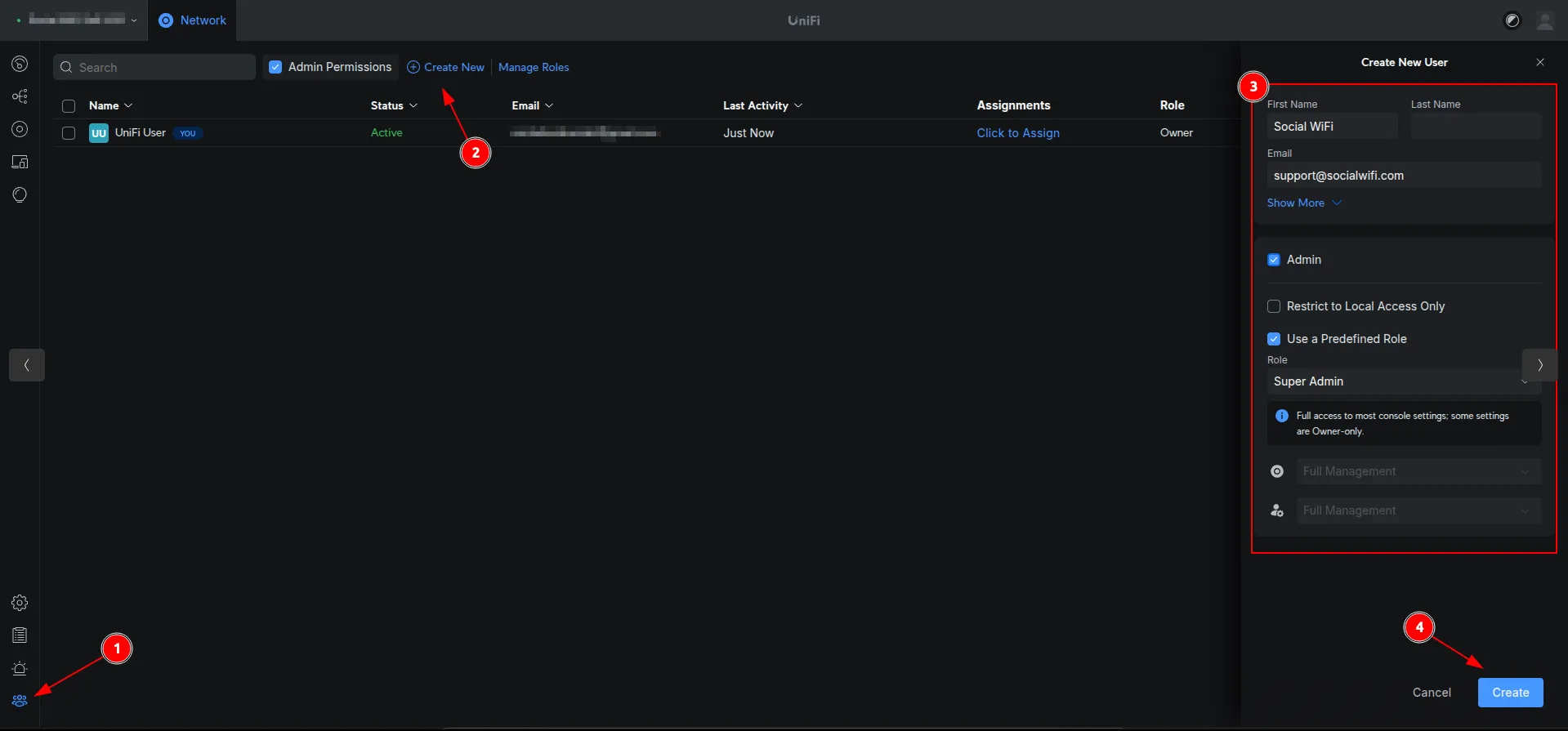
Wsparcie Social WiFi wymaga roli Super Admin, aby utworzyć dodatkowe konto API (zobacz Dostęp do kontrolera dla Social WiFi).
Tylko konta z rolą Właściciel (Owner) mogą utworzyć konto Super Admin. Jeśli Twoje konto posiada rolę Super Admin, poproś właściciela kontrolera o wysłanie zaproszenia w Twoim imieniu.
- Kliknij Utwórz (Create), aby wysłać zaproszenie.
Po wysłaniu zaproszenia wyślij wiadomość e-mail na adres support@socialwifi.com. Podaj nazwę lokalu z Panelu Social WiFi.